Scaling Energy Sales with HubSpot
without Enterprise Costs
How we replaced spreadsheet-based sales tracking with a unified HubSpot Starter pipeline, created a real inbound channel, and removed post–go-live friction to improve adoption.
Key Outcomes
Single source of truth pipeline
Inbound lead capture
Field-based deal updates
Our Role
Implementation Lead
Platform & Tools
The Problem
This team was running sales operations almost entirely out of spreadsheets.
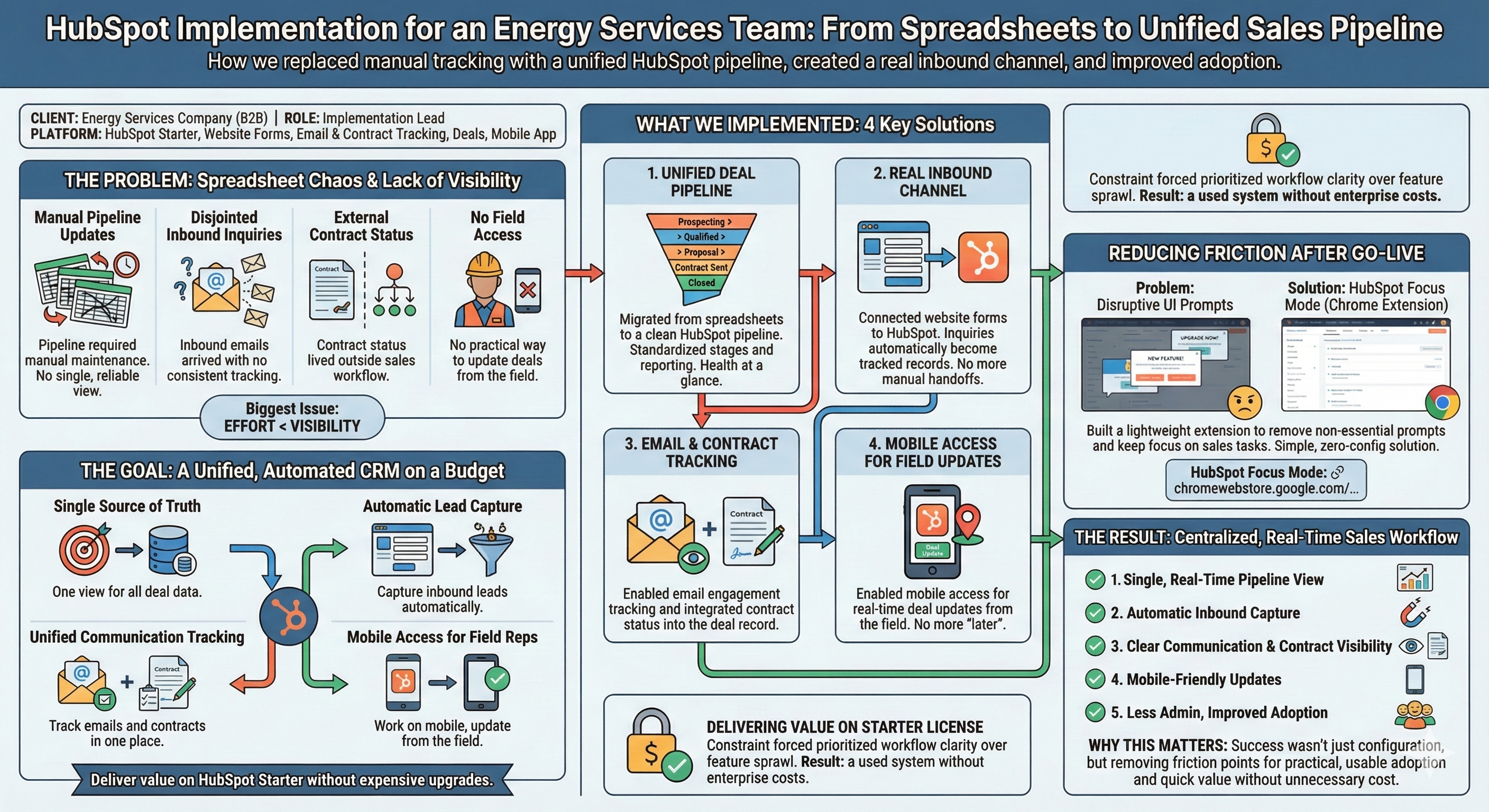
Leads were tracked manually. Deals lived in Excel. Contract status was maintained in a separate file. Follow-ups depended on individual inboxes. There was no single, reliable view of what was in flight or what needed attention.
The biggest issue wasn’t effort. It was visibility. Pipeline updates required manual maintenance, inbound inquiries arrived via email with no consistent tracking, and contract status lived outside the workflow. The system worked only as long as everyone remembered to keep it up to date—which, in practice, was rarely.
The Goal
Move the team out of spreadsheets and into a CRM that provided a single source of truth for deals, captured inbound leads automatically, tracked communication and contracts in one place, worked on mobile for field-based reps, and delivered value without forcing an expensive license upgrade.
What We Implemented
1. A Unified Deal Pipeline
We migrated deal tracking out of spreadsheets and into HubSpot with a clean, consistent pipeline. Each opportunity now moves through clearly defined stages, with standardized fields and reporting.
2. A Real Inbound Channel
We connected the company website to HubSpot forms so inbound inquiries flow directly into the CRM. Every submission becomes a tracked record, ready for follow-up and tied to deals.
3. Email and Contract Tracking
We enabled email tracking for visibility on deal records and brought contract tracking into HubSpot. Sales activity, deal progress, and document status now live in the same system.
4. Mobile Access for Field Updates
With HubSpot’s mobile access enabled and configured, reps can update deals from the field. Pipeline data stays current without relying on end-of-week spreadsheet cleanup.
Delivering Value on the HubSpot Starter License
All of this was implemented using HubSpot Starter. That constraint mattered. It forced us to design a solution that prioritized workflow clarity and adoption over feature sprawl. The result was a system the team actually used, without enterprise-level cost or complexity.
Reducing Friction After Go-Live
After rollout, we noticed that frequent in-app upgrade prompts and banners were disrupting sales workflows. While minor individually, these interruptions added up.
Rather than ignoring it, we built a lightweight Chrome extension that removes non-essential UI prompts and keeps HubSpot focused on core sales tasks. It requires no CRM configuration changes and simply reduces distraction.
HubSpot Focus Mode
A Chrome extension to remove distractions and focus on sales.
The Result
The team moved from spreadsheet-driven sales tracking to a centralized CRM workflow.
Real-Time Visibility
A single view of pipeline health without manual reconciliation.
Reduced Admin
Less "where is that file?" and more selling.
Why This Matters
CRM projects often fail after go-live not because of bad configuration, but because small sources of friction add up. This engagement focused on removing those friction points—even when the solution wasn't "more features"—resulting in a system the team actually uses.